Showing posts with label Social. Show all posts

Tuesday, 26 February 2013

Grow your audience across devices with Google+ Sign-In

Starting today, you can offer users the option to sign in to your website or mobile app with their Google credentials, and bring along their Google+ info for an upgraded experience.

In addition to secure authentication, Google+ Sign-In includes features to accelerate app downloads and deepen engagement (like over-the-air Android installs from your website, and interactive posts).

Read the official announcement on the Google+ Developers Blog, or get started right away with our developer docs.


 Was this blog post useful? Share your feedback with us.

Friday, 9 November 2012

Social Fridays: A recap

Over the past weeks, we’ve shown you through our Social Friday series how to get up and running with a Google+ strategy for your site and online business. We hope our posts and recent Hangout On Air have helped you learn more about what’s possible with Google+, and that you now have new ideas for optimizing the performance of your +page. Below is a list of the subjects we’ve covered, in case you’d like to review them.

Help your site stand out with the +1 button
Create a Google+ page to connect with users
Use images to deliver a richer experience
Gain visibility by verifying your Google+ page
See how your content was shared on Google+
Track and measure the performance of your +page
The New York Times uses Hangouts on Air to cover breaking news
Temptalia discovers the beauty of Google+
Using Google+, Brazilian news portal Estadão merges news with discussion
Google+ proves a recipe for success for Epicurious.com

Before we draw our series to a close, we’d like to encourage you to register for our upcoming social-focused webinar entitled ‘Grow and engage your audience with Google+’. This webinar will take place Tuesday, November 13th at 12pm PT (8pm GMT), and will discuss how social media is impacting online publishers . If you’re not able to attend the webinar, the recording will be posted to this site.

Thanks for following along with Social Fridays -- we’ll continue to post Google+ updates and tips for publishers here and on our AdSense +page, so stay tuned. Have a great weekend!

Posted by Arlene Lee - Inside AdSense Team

Thursday, 8 November 2012

Announcing the Learn with Google webinar series for publishers

As we’re nearing the end of 2012, we’ve all got business goals to meet. Some of you might even be prepping for your busiest season. Today we’re excited to announce the launch of the Learn with Google series to help our publishers make the most from the web.  We’ll be hosting two upcoming webinars as part of our Learn with Google program:  

    Google+ for publishers: Grow and engage your audience with Google+
    Tuesday, November 13, 2012 at 12:00pm PT / 3:00pm ET

    Join us for a discussion on how social media is impacting online publishers and how Google thinks about social. We'll also cover how you can grow and engage your audience on the web and mobile with Google+ using Google+ pages, the +1 button, Hangouts, and Authorship.

    Navigating Google's Mobile Ads Ecosystem
    Wednesday, November 28, at 12:30pm PT / 3:30pm ET

    Ever wonder who the buyers are in Google's mobile ads ecosystem and how their ads reach your inventory? Join us to learn the inner workings of Google's mobile ads ecosystem, including an overview of Google demand sources and the different channels advertisers can use buy your mobile inventory.

    Visit the webinar page for more information on these two events and to register. You can also stay up-to-date on the schedule by adding the Learn with Google webinar calendar to your own Google calendar.

    We look forward to hosting many more Learn with Google webinars for our publishers.

    Posted by Faith Rosen, Product Marketing Manager

    Friday, 2 November 2012

    Social Fridays: Google+ proves a recipe for success for Epicurious.com

    Every Friday, we’re posting Google+ tips to help publishers make the most of all of the features and resources available. Be sure to check back each week for the latest in our educational Social Fridays series!

    A Condé Nast site, Epicurious.com publishes original content from its own editors and leading food authorities from around the world every day. It incorporates more than 30,000 professionally tested and created recipes from celebrity chefs, premier food journalists and renowned cookbook authors, as well as 200,000 member-submitted recipes. Epicurious launched its Google+ page only late last year, and has now grown to over 2 million followers. Achieving the impressive milestone is down to a combination of factors: installing social sharing utilities on the Epicurious site, developing content tailored specifically to both the Google+ interface and to its audience, and embracing the features that are unique to the platform.

    “We started projecting growth based on similar growth with new networks,” says Jennifer Gaonach, Digital Consumer Marketing Director, Condé Nast, about their early days on the platform. “But we’ve exceeded the expected growth by many times. It’s great to see; by far it’s our largest network. It’s really taken off.”
    A number of slick design features at Epicurious.com help visitors share content and easily interact with the Google+ page. There’s a social sharing sidekick on the site that floats in the left margin alongside most content, as well as a ‘Connect with Epicurious’ module featuring social networks that sits on the top of the ad rail. These social networks also appear in the Epicurious email templates.

    Epicurious continues to refine its content strategy to best suit Google+ followers. “We really want to understand how we can engage these users and give them a great experience, and then when it makes sense, drive them back to Epicurious.com,” explains Jennifer. “As our audience has been growing, our editors have increased the frequency of our posts so that anyone who’s following us can know the latest article that’s being posted.” The team usually adds between three and five posts a day, and have found that visual content on Google+ performs particularly well.

    Social Reports in Google Analytics reveal that users coming to Epicurious from Google+ are more engaged than visitors from other social media platforms. Google+ is in the top 10 social referrers to the Epicurious pages, and the average visit duration from Google+ is 12% longer than it is from other social media platforms. The number of pages viewed per visit from these users is among the highest of all platforms too.

    What’s next? The Epicurious team plans to use Hangouts – high-quality videoconference functionality on Google+ – to create even deeper experiences for followers, including cook-alongs and exclusive chef chats.

    Hungry for more? Read the full case study on Epicurious.com’s use of Google+, and feel free to leave a comment on our AdSense +page about this story.

    Posted by Arlene Lee - Inside AdSense Team

    Friday, 26 October 2012

    Social Fridays: Using Google+, Brazilian news portal Estadão merges news with discussion

    Every Friday, we’re posting Google+ tips to help publishers make the most of all of the features and resources available. Be sure to check back each week for the latest in our educational Social Fridays series!

    While the world of communications has changed quite a bit since the Brazilian newspaper O Estado de São Paulo was founded in 1875, sharing high-quality news, analysis and reporting has remained its constant goal. In order to provide information in real time, the influential paper launched the portal Estadao.com.br in March 2000. And with social media a growing priority, Estadão launched its +Estadão page on Google+ in the second half of 2011.

    According to Digital Content Director Claudia Belfort, an early discovery was that Google+ offered a slightly different opportunity from other social media channels already in use by Estadão. “I realized that the comments on Google+ were more elaborate. Our followers are very interested in contributing to a discussion so we decided to invest more, always with this focus.”
    Over time, Estadão has built Google+ into its content strategy as a result of the platform’s unique ability to stimulate conversation and discussion. Cláudia believes that Estadão’s audience is interested in a network that’s not just social, but also enables knowledge exchange. With this in mind, the team publishes content specifically relevant to Google+ followers, rather than replicating the same content across all of the social media outlets that Estadão uses. They’ve found that the network responds particularly well to serious themes, so posts cover topics like economics, politics and current affairs, often with an informal tone.

    But it’s not only the exchange of ideas through the written word that Google+ facilitates for the newspaper. Estadão takes advantage of the visual strengths of the platform by posting full images, captivating video content and stimulating face-to-face discussion through frequent Hangouts, the free, high-quality video chat feature unique to Google+. Plenty of creative channel-specific initiatives are underway: a daily video of economic analysis, a nightly podcast summarizing the main news of the day and a weekly trailer previewing new cinema releases.
    Estadão uses Google Analytics to understand visitor behavior, and it’s clear that Google+ is having a positive effect on traffic to the portal. Over a five-month period, Analytics showed that visitors to the Estadão site from the Google+ page increased 540%. At the same time, this traffic generated an uplift in page views per visit of 18%. Currently, the Estadão Google+ page has over 500,000 followers.

    Want to replicate the brand’s success? Read all about it in the full case study, and feel free to share your experiences with us on our AdSense +page.

    Posted by Arlene Lee - Inside AdSense Team

    Friday, 19 October 2012

    Social Fridays: Your Google+ questions answered, via Hangout

    Every Friday, we’re posting Google+ tips to help publishers make the most of all of the features and resources available. Be sure to check back each week for the latest in our educational Social Fridays series!

    We've shared quite a bit of information on using Google+ for your business in the past few weeks, and so we'd now like to pause for a moment to hear from you. After reading our Social Fridays posts, do you have specific questions about developing a Google+ strategy for your site? Are you interested in hearing more about a certain topic like using Ripples or avoiding common pitfalls?

    To address your Google+-related questions and experiences, we’ll be hosting a Hangout On Air on Tuesday, October 30th at 10:00am PT with a Google+ specialist from the AdSense team. Visit our AdSense +page to RSVP to the event, and feel free to post your Google+ questions there. Anyone will be able to watch the live Hangout On Air, and if you miss it, we’ll post the recording to our YouTube channel so you can watch at a later time.

    We hope to see you in our upcoming Hangout! We’ll be back next week with another Google+ publisher success story.

    Posted by Arlene Lee - Inside AdSense Team

    Friday, 12 October 2012

    Social Fridays: Temptalia discovers the beauty of Google+

    Every Friday, we’re posting Google+ tips to help publishers make the most of all of the features and resources available. Be sure to check back each week for the latest in our educational Social Fridays series!

    Temptalia is one of the most popular beauty and makeup review blogs on the web, responsible for delivering the latest product information, tutorials and in-depth reviews to numerous fans. Given the blog’s global following, it’s easy to imagine a huge staff working behind the scenes, but in fact founder Christine Mielke still runs the blog herself and creates the vast majority of the site’s content.

    In addition to running the blog herself, Christine maintains a focus on social media for Temptalia. Christine established the +Temptalia page on Google+ not long after the platform launched, and continues to encourage fans to +1 and link to the brand’s page. On average, six new posts appear on Temptalia every day, and each of these is promoted through Google+. She says content that includes photography shines on the channel, and pretty products and colorful cosmetics tend to grab more attention than skincare.

    Google Analytics is key to helping Christine understand how each social media channel contributes to the blog’s traffic. Designed to make analysis easy, Social Sources reports in Analytics automatically segment referral traffic from hundreds of social networks. By using these reports, Christine can see that Google+ is among the top 10 social referrers to Temptalia, along with other Google properties including YouTube and Blogger.

    But to get further insights into the audience, Christine looks beyond the numbers and goes straight to the users themselves. “We try to listen in what our readers are asking for, what they are looking at, what they are most excited about,” she explains. This user-focused approach continues to drive Temptalia’s success. Christine’s advice to those getting started with Google+ pages is to use the channel as a valuable research tool in understanding a site’s readership.
    While Temptalia may be a small operation, its impact is significant – already Temptalia has over 600,000 followers on Google+. To read more about how Christine, a lifelong beauty enthusiast, is using Google+ to maintain, build and serve her blog’s audience, read the full case study.

    Posted by Arlene Lee - Inside AdSense Team

    Friday, 5 October 2012

    The New York Times uses Hangouts on Air to cover breaking news

    Every Friday, we’re posting Google+ tips to help publishers make the most of all of the features and resources available. Be sure to check back each week for the latest in our educational Social Fridays series!

    A few weeks ago, we talked about the possibilities around using Google+ Hangouts on Air to hold live broadcasts. This free feature allows you to live stream a conversation between 10 participants, directly from your Google+ page, your YouTube channel, and even your website, for a global audience to view.

    The New York Times has been hosting frequent Hangouts on Air to engage with their audience, with topics ranging from foreign affairs to professional baseball to voter concerns. Since setting up the +New York Times page in November 2011, the Times has aimed to create a hub for their online readers to not only discover news, but to also participate in discussion.

    Recently, the Times used Hangouts on Air to cover a breaking news story and reach a wide online audience. Just hours after the the Supreme Court’s monumental decision to uphold President Obama’s Affordable Healthcare Act, the Times became the first major media outlet to discuss the news via live web video. The Hangout video was broadcasted live on the +New York Times page as well as on the NYTimes Opinion page, allowing the discussion and analysis to be shared with a wider audience.


    The Times team prepared for a smooth Hangout by securing guest participants for their live broadcast a week in advance. When the date of the decision arrived, the Times added a graphic placeholder to the NYTimes Opinion page and published a post to their +page to publicize the upcoming Hangout. Once the Hangout started, they embedded the video directly into the Opinion page and also added a homepage promotion to their site to drive awareness. After the Hangout was completed, the Times team quickly edited the video footage on YouTube and uploaded it to the front page of NYTimes.com for additional visibility.

    For more information, read the full case study. If you’re ready to start broadcasting, be sure to review our tips and then get started with your own Hangout on Air. If you have any advice of your own to share about Hangouts, feel free to post them to our AdSense +page!

    Posted by Arlene Lee - Inside AdSense Team

    Friday, 28 September 2012

    Social Fridays: Track and measure the performance of your +page

    Every Friday, we’re posting Google+ tips to help publishers make the most of all of the features and resources available. Be sure to check back each week for the latest in our educational Social Fridays series!

    We know publishers love metrics, and so following on last week's look at Google+ Ripples, today we’ll show you how you can analyze the impact of your Google+ page with Social Reports in Google Analytics.

    If you’re already using Analytics to measure traffic to and interaction with your pages, be sure to use Social Reports to analyze your social media efforts. The Social Sources report will show you the social networks that are driving traffic to your site or any specific page, and help you identify which content is popular across various networks. In addition, you can compare the time spent on your site by visitors coming from various networks to see where engagement is the highest.

    Also be sure to visit the Social Sharing report to gain an understanding of which of your social media share buttons are being clicked and for which content. Analytics will automatically report the +1 activity you receive from visitors on your site, and other social plug-ins can be easily adapted to report to Analytics.


    Give these reports a try to gain a better understanding of how your social efforts are impacting user engagement. Have you made any updates to your content or your +page after viewing these reports? Visit our AdSense +page to share your tips with other readers.

    Now that you know how to monitor your success with Google+, tune in next week when we’ll share a publisher case study. Have a great weekend!

    Posted by Arlene Lee - Inside AdSense Team

    Friday, 21 September 2012

    Social Fridays: See how your content was shared on Google+

    Every Friday, we’re posting Google+ tips to help publishers make the most of all of the features and resources available. Be sure to check back each week for the latest in our educational Social Fridays series!

    Since we started 4 weeks ago, we’ve walked you through placing the +1 button on your pages, creating and verifying your Google+ page, and adding the Google+ badge to your site. You’ve completed the main steps for getting set up on Google+ and are posting regularly -- but do you know how your content is spreading? In today’s Social Fridays post, we’ll show you how to find this information using Google+ Ripples.

    With Ripples, you can now see how your public content was reshared over time on Google+, and what users were saying about it. To try it out, just find a public post and select ‘View Ripples’ from the drop-down menu in the upper right-hand corner of the post. You’ll see a number of circles that each correspond to a user that has reshared your content, and inside the circle you’ll see the people who have reshared the link from that person (and so on). Circles are roughly sized based on the relative influence of that person -- so the larger a person’s circle is, the more reshares have resulted from their original reshare.


    You can also see who has been discussing your content on Google+, even if they didn’t reshare your original post. Circles on the Ripples page that aren’t connected to other circles represent individuals who have independently shared your content. Scroll down to the bottom of the page to play an animated version of the visualization that shows how your link was shared over time. You can also see a line graph that illustrates activity on the post.

    With this information, you can identify key influencers or top contributors in your community who are helping to get the word out about your content -- whether or not it was reshared directly from your +page. You might want to reach out to these engaged individuals to ask for their feedback about your content, or even set up a Hangout to talk in more detail with them.

    Give Ripples a try today, and see how some of your recent content has been publicly reshared. For more information, watch this video:


    Want more reports and metrics? Be sure to join us here again next Friday, when we’ll walk you through the reporting tools you can use to track the performance of your +page. Until then, let us know on our AdSense +page if you’ve found any interesting insights via Ripples.

    Posted by Arlene Lee - Inside AdSense Team

    Friday, 14 September 2012

    Social Fridays: Gain visibility by verifying your Google+ page

    Every Friday, we’re posting Google+ tips to help publishers make the most of all of the features and resources available. Be sure to check back each week for the latest in our educational Social Fridays series!

    Now that you’re regularly posting content to your Google+ page and using features like Hangouts, we’ll move on to the importance of verifying your +page.

    What does it mean to verify a +page?


    Verifying your +page confirms that the +page actually belongs to you. Once your +page is verified, it’ll appear with a checkmark designed to help our users find what they’re looking for.

    Why should I verify my +page?

    Not only does verification help users confirm the authenticity of your +page, but it also brings you a major benefit only available to verified +pages. Verified +pages that are popular and engaging may appear on the right side of relevant Google.com search results, for users who are logged in. This is designed to help users find the relevant content they’re looking for, and may increase the visibility of relevant +pages. Please keep in mind that to be eligible, the +page also needs to be active with a meaningful number of followers and regularly-updated content.


    How do I verify my +page?

    Follow these three steps:
    1. Link your +page to your website: Fill out the ‘About’ section of your Google+ page, being sure to enter your site’s top-level URL.
    2. Link your website to your +page: Add a Google+ badge or code snippet to your site, which lets us know that the site is associated with your +page. We recommend using the Google+ badge, as it can help you attract additional followers -- for top publishers, adding the Google+ badge helped drive a 38% increase in followers. You can select the size of the +badge for your pages, and with some of the larger sizes, users will be able to add your +page to their circles without leaving your site.
    3. Post actively to your +page and gain a meaningful number of followers.
    4. Complete our verification request form.
    As you complete the verification process, be sure to continue posting regularly to your +page to engage with your users. To help attract followers to your pages we also recommend promoting your +page on other relevant sites or blogs you own, as well as other social destinations. You can also place an author tag on your online materials, which means your authorized photo and name appear next to search results for content you’ve created.

    Enjoy your weekend, and we’ll see you back here next Friday when we’ll show you a feature that allows you to track how your content spreads on Google+.

    Posted by Arlene Lee - Inside AdSense Team

    Friday, 7 September 2012

    Social Fridays: Use images to deliver a richer experience

    TGIF, it’s time for our next Social Fridays post! This weekly series will take you through best practices and tips to help you make the most of Google+ for your site.

    As you’ve been posting new content to your +page and perhaps using the Google+ mobile app, you may have noticed that Google+ is quite a visual platform. The Financial Times has found that images and videos have the highest engagement on their +page, and we’ve heard similar comments from other publishers. Today we’ll share a tip on how to make the most of the visual nature of the platform to help increase interaction with your content.

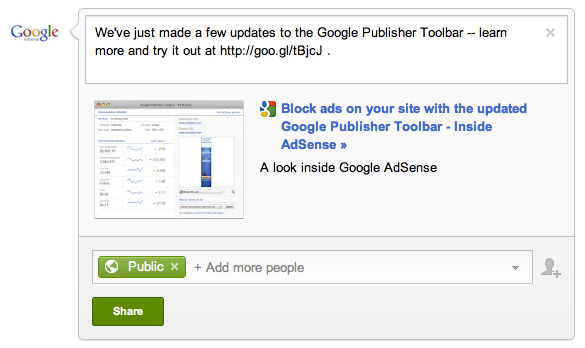
    To post a link to an article or page of your site, you may currently be using the ‘Attach link’ option on your +page and pasting in the URL of the article. When you post this way, a small thumbnail of an image from that article will appear next to a text preview, or a relevant icon. You then have the option to post additional comments above the content before you share it.

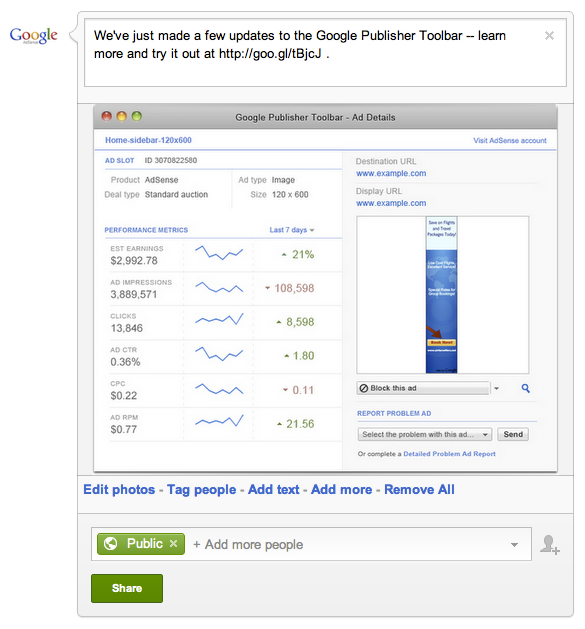
    From time to time, instead of simply attaching the link, try posting the image from the article as the main content on your +page. Then, in the comment field above, enter the description with a shortened link to the full content. This allows users to see a larger version of the image from the article and can draw them in, while the shortened link above the image directs them to the article on your site for the full content.

    Here’s a side-by-side comparison of how these two approaches would look while drafting a post for your +page:

    Link as attachment 


    Image as attachment 

    Give this technique a try for some of your posts, and see how it can help you build a richer experience on your +page. Have you found success with posting images, or do you have other tips for +pages to share? Leave a comment on our AdSense +page and discuss your experiences with other publishers.

    Tune in again next week, when we’ll discuss verifying your +page. In the meantime, feel free to head over to our AdSense +page to share your thoughts about today’s content with other readers.

    Posted by Arlene Lee - Inside AdSense Team

    Friday, 31 August 2012

    Social Fridays: Create a Google+ page to connect with users

    Welcome back to our Social Fridays series, where we’re providing tips for getting set up optimally on Google+ each week. Last week, we shared best practices around placing +1 buttons on your site and tracking their performance. Today, we’ll move on to creating a Google+ page for your site.

    A Google+ page is the hub of your site’s identity on Google, and offers a number of tools to help you reach audiences in new ways. On your +page, you can share your articles, photos, YouTube videos, and even host live broadcasts. Your +page will also include a +1 button that users can click to recommend you. Think about your Google+ page as a way to complement your site, allowing you to grow and measure user engagement before directing users back to your pages for more of your great content. Creating a Google+ page is simple and takes just minutes.


    Once you’ve set up your own +page, be sure to set up a content pipeline and post regularly.
    One great way to engage with users via your +page is to host regular Google+ Hangouts. Hangouts are free, multi-person video chat sessions for up to 10 people that can help you get closer to your users, no matter where in the world you’re located. We all know that talking face-to-face can convey much more than simply typing messages -- so consider hosting classes via Hangout if you run a hobby-related site, or invite loyal readers to discuss recent content you’ve published.

    You also have the option of broadcasting your hangout to the world via Hangouts on Air. Up to 10 people can still actively participate, but anyone can tune in to watch via live streaming on your Google +page, your YouTube channel, or even your own site. Every Hangout on Air will be automatically recorded and saved to your YouTube channel, so you can edit and share the content afterwards. Whether you want to interview an expert, give a behind-the-scenes tour of your business, or just share your content live in front of a global audience, Hangouts on Air allow you to connect with your users in a new way.


    To create a Google+ page for your site and get started with Hangouts, sign in to your personal profile on Google+ and then follow the simple instructions. You’ll be able to enter details about your site and upload a profile photo so your users will be able to recognize you. For more information about getting started with +pages, visit the Google+ Help Center.

    Feel free to share feedback about this post and your experience with using Hangouts on our AdSense +page. Then, join us here next week for our next Social Friday post -- we’ll share a little-known best practice for posting to your +page that can help increase engagement with your users.

    Posted by Arlene Lee - Inside AdSense Team

    Friday, 24 August 2012

    Social Fridays: Help your site stand out with the +1 button

    As Google+ has continued to evolve and grow, we’ve released a number of features and tools to help you engage with your users in new ways. We’ve heard from publishers that they’d like to ensure they’re getting set up in the right way on Google+, and so we’re kicking off a Social Friday series right here on our blog. Our goal is to help you make the most of Google+, discover ways to reach new audiences, and use our resources to make data-driven decisions.

    Even if you’ve already gotten started with Google+, we encourage you to follow along over the next few weeks to make sure you’re using our social tools optimally for your website and business. Today, we’ll start off our series with a look at the +1 button, and show you how you can track its impact with Webmaster Tools.

    The +1 button helps you expand your audience by enabling users to recommend your content to their friends and contacts. When a user clicks the +1 button on your site, they’ll be able to share your site’s link with their contacts via their Google+ stream. This can help you extend your reach beyond just your existing fans, to their circles of friends. Be sure to place the +1 button on your pages so that users can endorse your content -- we recommend locations like the header and footer of your pages, and also on pages that tend to be shared frequently, like articles or product pages.

    In addition, +1 recommendations will be visible to a user’s friends and contacts on relevant Google.com search results, which can help your site stand out. For example, let’s say John is a fan of your content and he clicks a +1 button on your site. When John’s friend Sue is logged in to her Google Account and performs a Google.com search that includes your site in the results, she may see an annotation below your site that tells her John has +1’d it. This annotation may help your site stand out to Sue because it’s personally relevant to her. Overall, as potential visitors see recommendations from their friends and contacts among their Google search results, you could see more, and better qualified, traffic coming from Google.

    So how is the +1 button performing for you so far? You can find out using Social Reports in Analytics.

    Get started with the +1 button on your pages today -- just generate a short snippet of code and paste it into the HTML of your site, as you do with your AdSense ad code. You’ll also be able to customize the size and layout for your site. For help with the +1 button, visit our Google+ Webmaster FAQ.

    Thanks for joining us for our first Social Fridays post. Next week, we’ll discuss Google+ pages for your business and how to get set up optimally. Do you have feedback or best practices to share with other publishers about today’s content? Feel free to leave us a comment on our AdSense +page.

    Posted by Arlene Lee - Inside AdSense Team

     
    Design by Free WordPress Themes | Bloggerized by Lasantha - Premium Blogger Themes | Best WordPress Themes